
Monkey See, Monkey Prototype

Products can have rough drafts too. To see how well they work and what people think of them, companies often create early samples—or prototypes—of potential products. Here are some examples of prototypes that turned into popular gadgets and gizmos (aplenty); sometimes, as in the case of the iPhone, they may look nothing like the product that ultimately made it to market. Learn more about the prototyping cycle by researching the the terms below, then discuss with your team: are there other things in life that would benefit from prototyping? Is there any difference between a prototype and a draft?
This article goes through prototypes of some of the most well-known gadgets that have shaped the world around us, and frankly some of them do not look anything like their final version.
Development of the format started in 1988, when Nintendo signed a deal with Sony to produce a CD-ROM add-on for the SNES. After several years of development, Sony introduced a standalone console at 1991’s summer Consumer Electronics Show called the “Play Station.” The system was to be compatible with existing SNES titles as well as titles released for the SNES-CD format. However, due to licensing disagreements with Sony, Nintendo announced that it had formed an alliance with Sony’s rival Philips to produce the SNES-CD add-on.
#10 Game Boy Color
The Game Boy Color was a response to pressure from game developers for a new and much more sophisticated system of playing, as they felt that the Game Boy, even in its latest incarnation, the Game Boy Pocket, was insufficient. The resultant product was backward compatible, a first for a handheld system, and leveraged the large library of games and great installed base of the predecessor system.
#9 Motorola DynaTac
This was a pioneer of today's mobile phones. Motorola had long produced car phones that were chunky and drained too much power to allow their use without the automobile’s engine running. Mitchell’s team, which included Martin Cooper, developed portable cellular telephony, and Mitchell was among the Motorola employees granted a patent for this work in 1973.
#8 Apple I
On March 5, 1975 Steve Wozniak attended the first meeting of the Homebrew Computer Club in Gordon French’s garage. He was so inspired that he immediately set to work on what would become the Apple I computer. Wozniak calculated that laying out his design would cost $1,000 and parts would cost another $20 per computer; he hoped to recoup his costs if 50 people bought his design for $40 each. His friend Steve Jobs obtained an order from a local computer store for 100 computers at $500 each. To fulfill the $50,000 order, they obtained $20,000 in parts at 30 days net and delivered the finished product in 10 days. The Apple I went on sale in July 1976 at a price of US$666.66, because Wozniak “liked repeating digits” and because of a one-third markup on the $500 wholesale price. About 200 units were produced and all but 25 were sold during nine or ten months.


#7 Atari VCS
The Atari 2600 is a video game console released in September 1977 by Atari, Inc. It is credited with popularizing the use of microprocessor-based hardware and ROM cartridges containing game code, a format first used with the Fairchild Channel F game console. This format contrasts with the older model of having non-microprocessor dedicated hardware, which could only play the few games which are physically built in to the unit.
#6 Supersoaker
Super Soaker is a brand of recreational water gun that utilizes manually-pressurized air to shoot water with greater power, range, and accuracy than conventional squirt pistols. The Super Soaker was invented in 1982 by engineer Lonnie Johnson. The prototype combined PVC pipe, Plexiglass, and an empty plastic soda bottle. Originally sold by Larami and now produced by Hasbro under the Nerf brand, Super Soaker has generated more than $1 billion in total sales.
#5 Push-button Telephone
Western Electric experimented as early as 1941 with methods of using mechanically activated reeds to produce two tones for each of the ten digits and by the late 1940s such technology was field-tested. But the technology proved unreliable and it was not until long after the invention of the transistor when push-button technology matured. On 18 November 1963 the Bell System in the United States officially introduced dual-tone multi-frequency (DTMF) technology under its registered Touch-Tone mark.
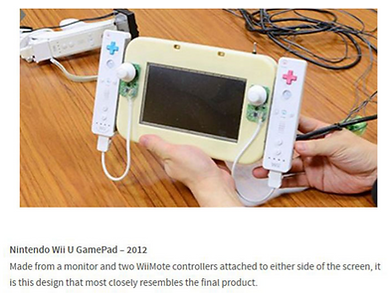
#4 Nintendo Wii U
The system was first conceived in 2008, after Nintendo recognized several limitations and challenges with the Wii, such as the general public perception that the system catered primarily for a “casual” audience. With Wii U, Nintendo explicitly wishes to bring “core” gamers back. Game designer Shigeru Miyamoto admitted that the lack of HD and limited network infrastructure for Wii also contributed to the system being regarded in a separate class to its competitors’ systems, the PlayStation 3 and Xbox 360.
#3 XBox
In 1998, four engineers from Microsoft’s DirectX team, Kevin Bachus, Seamus Blackley, Ted Hase and DirectX team leader Otto Berkes, disassembled some Dell laptop computers to construct a prototype Microsoft Windows-based video game console. The team hoped to create a console to compete with the Sony’s upcoming PlayStation 2, which was luring game developers away from the Windows platform. The team approached Ed Fries, the leader of Microsoft’s game publishing business at the time, and pitched their “DirectX Box” console based on the DirectX graphics technology developed by Berkes’ team.
#2 iPad
Apple co-founder Steve Jobs said in a 1983 speech: “…that Apple’s strategy is really simple. What we want to do is we want to put an incredibly great computer in a book that you can carry around with you and learn how to use in 20 minutes … and we really want to do it with a radio link in it so you don’t have to hook up to anything and you’re in communication with all of these larger databases and other computers.”
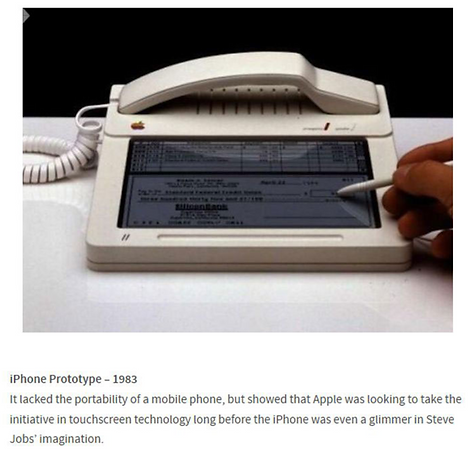
#1 iPhone
Business Insider reports that “…the prototype was designed by Hartmut Esslinger, who helped design the Apple II desktop PC. It’s pretty slick for a device from the early 80s, featuring a touchscreen and stylus input. On the screen, you can see a virtual check and an accounting app, so it looks like Apple wanted to design a hybrid phone/computer as early as 1983.”





It's been more than a decade Apple introduced its first ever iPhone. The company went to a great extent to keep the device a secret and prevent it from leaking. Internally, the device was referred to as the "M68" and "Purple 2". Apple manufactured special prototype development boards. The unit features a red PCB as Apple intended it for the prototype. The production units, on the other hand, had a blue or green colored PCB. The board you see in the images was designed for the engineering validation test (EVT) sample and was used by engineers working on the modem and software of the device. Seeing the prototype, it looks like Apple really wanted to keep the original iPhone a secret. Another interesting aspect of the prototype is that upon connecting it to iTunes, it is detected as iPhone. It's quite intriguing to note that the PCB was shrunk to fit in the iPhone.

Prototyping is a creative and iterative process that helps designers, developers, and stakeholders visualise, test, and refine ideas before the final design is locked in. Key benefits of prototyping include:
1. Validates Ideas Early: Prototyping helps identify what works and what doesn’t before investing significant time and money into development.
2. Improves Communication: A prototype is a visual aid that makes it easier to share your vision with teammates, clients, or investors.
3. Reduces Risk: By testing assumptions early, you minimise the chances of costly mistakes down the line.
4. Enhances User Experience: Prototypes allow you to test how real users interact with your product, leading to improvements in usability and functionality.
5. Speeds Up Development: By ironing out issues early, the final development process becomes more efficient and focused.
There are 6 major steps to prototyping:
1. Ideation and Conceptualisation: This phase is all about brainstorming and defining what problem your product will solve. Sketch out rough ideas, jot down user needs, and outline the basic features. This stage is intentionally broad and flexible.
2. Creating Low-Fidelity Prototypes: Once you have a clear concept, the next step is to create a low-fidelity prototype. These are simple, often hand-drawn sketches or wireframes that focus on structure and flow rather than design details.
3. Developing High-Fidelity Prototypes: These prototypes are much closer to the final design and include detailed visuals, colors, typography, and interactivity. High-fidelity prototypes are often created using specialised software tools that simulate how the product will behave.
4. User Testing and Feedback: Share your prototype with real users, stakeholders, or team members, you can gather invaluable feedback on usability, design preferences, and potential issues. Testing helps validate your assumptions and reveals insights that may not have been obvious during the design phase.
5. Iteration and Refinement: The goal here is continuous improvement—addressing pain points, enhancing features, and polishing the overall user experience.
6. Final Design and Handoff: The high-fidelity prototype now serves as a detailed blueprint for developers and engineers to build the actual product. Clear documentation, design specs, and interaction guidelines accompany this final prototype, ensuring a smooth transition from design to development.
There are different ways to prototype too. Find the one that is suitable for your product and skillset.
• Paper Prototyping: Simple sketches on paper to test layout and flow.
• Digital Wireframes: Basic digital mockups focusing on structure.
• Interactive Prototypes: Clickable models that simulate real interactions.
• 3D Prototypes: Physical models, often used in product design or manufacturing.
• Storyboard Prototypes: Visual sequences showing user journeys or scenarios. Choosing the right type depends on your goals, resources, and stage of the project.
Some common prototyping mistakes:
• Scope Creep: It’s easy to get caught up adding too many features during prototyping. Focus on core functionality first.
• Over-Polishing Early: Resist making the prototype look perfect too early. It’s about testing ideas, not final visuals.
• Ignoring Feedback: Always be open to criticism and use it to improve your design.
• Poor User Testing: Test with real users who represent your target audience, not just internal teams.
sketch
Sketching is a low-fidelity, "quick and dirty" way to visualize ideas. It acts as the "first line of attack" for design problems, focusing on the conceptual essence rather than technical precision. To generate multiple ideas, sketches are typically disposable, plentiful, and minimalist. They use basic shapes—circles, squares, and lines—to convey layout and flow.
storyboarding
Storyboarding is a low-fidelity method used to visually predict and explore a user's experience with a product over time. It acts as a "visual script" that bridges the gap between abstract user research and tangible design solutions. Storyboards are dynamic and contextual; they focus on the "why" and "when" by showing a human-centered narrative of the experience.


paper prototypes
Paper prototyping is a low-fidelity design method where teams create hand-drawn, physical representations of digital interfaces to test concepts early. It allows designers to visualize user flows and interactions using simple materials like paper, markers, and sticky notes before writing any code. Testing usually involves a "human computer" and a participant. Interacts with the paper by "pressing" drawn buttons or "scrolling" by pulling paper strips. A team member who manually swaps screens or adds sticky-note overlays (like pop-up menus) in response to the participant's actions.

low vs. high fidelity
In prototyping, fidelity refers to how closely a model resembles the final product in terms of visual design, interactivity, and content. Lo-fi prototypes, such as sketches and wireframes, are used during early ideation to test high-level concepts and navigation. Common tools include paper and pen, Miro, or Balsamiq. Hi-fi prototypes are detailed, interactive simulations that look and behave like a real app or website. Common tools include Figma, Sketch, or Adobe XD.
wireframing
In prototyping, a wireframe is a low-fidelity visual blueprint that outlines the skeleton of a digital product. It focuses on what content goes where and how it is organized, rather than the "look and feel" (colors or fonts). They define the visual hierarchy and relationship between different on-screen elements. Wireframes are "Blueprints"- They are generally static and non-interactive, focusing on structure. Prototypes are "Simulations"- They are typically clickable and interactive, focusing on behavior and testing how the final product will actually work.


mockup
In prototyping, a mockup is a static, high-fidelity visual model that shows what the final product will look like. Mockups include exact colors, typography, logos, and images, which allows the team to review the visual identity and brand alignment. It is the best tool for showing clients exactly what they are buying before developers start coding. Figma is the industry standard for creating and sharing high-fidelity mockups.
proof of concept
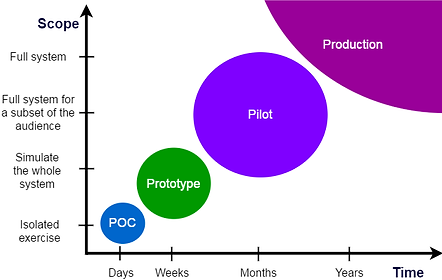
A Proof of Concept (POC) is a small-scale exercise used to demonstrate that a specific idea or method is feasible and can work in a real-world setting. Unlike a prototype, which explores how a product will look and behave, a POC is primarily concerned with answering one fundamental question: "Can this actually be built?" By identifying technical challenges, roadblocks, or limitations early, a POC helps teams avoid investing significant resources into unworkable ideas.

user testing
User testing is the final stage of the design thinking process where real users interact with a prototype to provide feedback on its functionality, usability, and value. It is an iterative method used to validate assumptions and uncover friction points before a product is fully developed. Often through a user insights agency, tests are designed to check how easy and intuitive it is for users to complete specific tasks ("Usability Testing"). Comparing two different versions of a design to see which one performs better for a specific goal, like a sign-up flow.

MVP
An MVP (Minimum Viable Product) is the version of a new product that allows a team to collect the maximum amount of validated learning about customers with the least effort. Unlike a prototype, which is built to test design or technology, an MVP is a functional product built to test market demand and business viability. The goal of an MVP is to move through the Build-Measure-Learn feedback loop as quickly as possible. You build the smallest thing, measure how users interact with it, and learn whether to pivot (change direction) or persevere (keep improving the current path)
minimum marketable feature
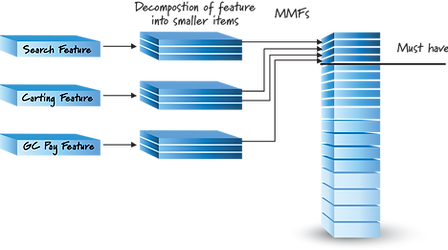
A Minimum Marketable Feature (MMF) is the smallest unit of functionality that provides tangible value to both the user and the business. While an MVP is a whole product used for learning, an MMF is a specific feature within a product that is complete enough to be marketed and "sold" as a benefit. Using MMFs helps teams avoid "feature creep." Instead of building 50% of ten different features, the team focuses on finishing 100% of one MMF so that it can be released and generate revenue or user satisfaction immediately


Instead of hiring engineers to work with a factory in Shenzhen (or Baja California) to create a product sample, today an inventor can try out a new concept with simulated models and 3D printed mockups. Even your school might have a “makerspace” that you can use to channel your inner Thomas Edison—or Sarah Boone. Consider the advantages and disadvantages of such rapid prototyping, then discuss with your team: should access to these tools be limited to those who can use them responsibly?
Sarah Boone was an African American dressmaker who made her name by inventing the modern-day ironing board. In her patent application, she wrote that the purpose of her invention was "to produce a cheap, simple, convenient and highly effective device, particularly adapted to be used in ironing the sleeves and bodies of ladies' garments." With its approval in 1892, Boone became one of the first African American women to be awarded a patent.
Born from enslaved parents, after her husband died, she became a businesswomen, defying the odds and learning how to read at the age of 40+. To that point, dressmakers were primarily ironing their clothes on a wooden plank placed across two chairs, a method that was fine for a wide skirt but ill-suited for the contours of tight, fitted material. Boone's solution was to create a narrower, curved board that could slip into
.jpg)
sleeves and allow for a garment to be shifted without getting wrinkled. Her creation also was padded, to eliminate the impressions produced by a wooden board, and collapsible for easy storage. Demonstrating the writing skills she had acquired only a few years earlier, Boone applied for a patent for her new and improved ironing board in 1891. She was awarded U.S. Patent No. 473,653 on April 26, 1892, making her one of the first African American women to earn that formal distinction for inventors.
Rapid software and hardware developments allow new opportunities and exciting new technologies to create dynamic modelling of ever-greater complexity. Models can be simulated by designers using software, tested and trialled virtually before sending to a variety of peripheral machines for prototype manufacture in an ever-increasing range of materials. The ease of sending this digital data across continents for manufacture of prototypes has major implications for data and design protection. The increasing effectiveness of rapid prototyping techniques in terms of both cost and speed enables designers to create complex physical models for testing.
-
entails a machine that produces a complete product including internal details, at a fairly quick rate. Allows designers to easily test complex geometries and make "instant" changes to CAD models without high-cost consequences.
-
reduce product development time as prototypes are quickly made and can be tested. Lowers overall costs by identifying flaws early and eliminating the need for expensive traditional tooling and molds for every iteration.
-
one-off products are made for different or specialised situations
-
is an additive manufacturing technique as opossum to subtractive manufacturing (mills, lathes, etc). As an additive manufacturing process, technologies like 3D printing use only the necessary material, making them more environmentally friendly than traditional subtractive methods.
RP Process
-
Using CAD software produce a full scale model
-
Export or convert model in STL (Standard Triangle Language and Standard Tessellation Language).
-
send to RP machine
-
manufacture the item
-
clean up the item
Stereolithography: Stereolithography (SLA) is a 3D printing process.
-
that uses a vat of photosensitive resin and a vertically moving platform.
-
It uses a laser beam, directed onto the surface of the photosensitive resin, to print the pattern of the current model layer by hardening the photosensitive resin.
-
The platform then moves down by a layer thickness so the next layer can be printed.
-
Also known as optical fabrication, photo-solidification, solid free-form fabrication and solid imaging.
-
Used for producing models & prototypes, casting patterns, production parts and products.
Laminated object manufacturing (LOM)
-
LOM machines take the sliced CAD data from the 3D model and cut out each layer from a roll of material, using a laser or plotter cutter. These sliced layers are glued together to form the model, which is either built on a movable platform below the machine or on pins when using card. (IB TSM 2015)
-
A rapid prototyping systems that creates a 3D product by manufacture (LOM) converting it into slices, cutting the slices out and joining the slices together
Fused deposition modelling (FDM)
-
A heated extrusion nozzle (extruder) that moves through the x & y axis
-
A plastic (such as ABS, PLA), metal or composite (such as 30% metal, bamboo, etc fill PLA) filament is fed through the extruder
-
basically a CNC robot that holds a small extrusion head. The extrusion head moves back and forth along a platform, building up a 3D model by feeding heated plastic wire through the extrusion head.
-
Either the platform or extruder move through the Z axis place a layer if build material
-
Controlled by CAM software.
Selective laser sintering (SLS): a 3D printing process based on sintering.
-
A high powered CO2 laser is used to sinter a thin layer of heat-fusible powder that gradually builds up the 3D model.
-
Powders include, plastic, metal, ceramics and glass


In the world of software, AI-powered vibe coding allows users to create programs without writing a line of code. Just ask a chatbot for what you want and watch it appear. You might want to try vibe-coding yourself, then discuss with your team: should we be worried about a future flooded with too many programs of uncertain quality and with limited support? Is it better if not everyone can get “there” so easily?

“Vibe coding” is a new and loosely-defined term in software development that refers to the practice of prompting AI tools to generate code rather than writing code manually. In software engineering , development is reshaping from strict, manual coding and becoming more flexible and AI-powered—and vibe coding is at the forefront of this change. “Vibe coding” is introduced by renowned Computer scientist Andrej Karpathy in February 2025 and emphasized the significance of AI tools in software development.
By prioritizing experimentation before refining structure and performance, vibe coding embraces a “code first, refine later” mindset. This opens opportunities for developers to prioritize building first and optimizing later. Also, in an agile framework, vibe coding aligns with the principles of fast-prototyping, iterative development and cyclical feedback loops. This allows enterprises to focus on these principles while fostering innovation, instinctive problem-solving and flexible coding capabilities. However, AI simply generates code, but true creativity, goal alignment and out-of-the-box thinking remain uniquely human so human input and oversight is important and cannot be overridden.
"Vibe coding"—using AI agents to generate code based on natural language prompts—can create significant challenges for computer scientists who later need to maintain or fix that code, potentially leading to career-impacting issues if best practices are ignored. Rapid delivery can mask architectural flaws, technical debt, and security vulnerabilities that become career-limiting problems if not proactively managed.
Lack of Structure and Documentation: Vibe coding often produces code that lacks consistent structure, clear documentation, or standardized naming conventions, making it hard for others (or even the original author) to understand and maintain later.
Hidden Technical Debt: Rapid, iterative code generation without thorough review can introduce subtle bugs, security vulnerabilities, and architectural flaws.
Inconsistent Quality: If developers accept AI-generated code without rigorous testing and code audits, they risk deploying solutions that are fragile, poorly integrated, or incompatible with existing systems.
Difficulty in Debugging: When AI-generated code is built incrementally or with vague prompts, it may rely on undocumented dependencies or assumptions, leading to confusing errors that are hard to trace and fix.
In 1770, a Hungarian engineer announced a startling invention: a machine capable of playing chess. This “Mechanical Turk” toured the world, impressing everyone from Benjamin Franklin to Edgar Allan Poe. There was just one problem: it was not an early example of AI, but a hoax, operated by a chess master hidden within. Companies today may still take a similar approach—known as “Wizard of Oz” testing—to test user response before production. Discuss with your team: is it okay to mislead users during product testing in order to make the finished versions of those products better?

At the dawn of that 1770s, an inventor by the name of Wolfgang von Kempelen debuted his latest creation in Vienna: A chess-playing automaton made for Habsburg Archduchess Maria Theresa. Known initially as the Automaton Chess Player and later as the Mechanical Turk—or just the Turk—the machine consisted of a mechanical man dressed in robes and a turban who sat at a wooden cabinet that was overlaid with a chessboard. It appeared to be a mechanical man in Ottoman robes and a turban, seated behind a wooden cabinet filled with whirring clockwork and gears. Kempelen would open the doors to "prove" no one was inside before a match. The Turk was designed to play chess against any opponent game enough to challenge him.
A hidden human chess master sat inside the cabinet. By shifting positions and using magnets to track pieces from below, the operator controlled the Turk's mechanical arm via a pantograph device. The Turk responded skillfully to the unpredictable behavior of humans. This machine seemed to be operating autonomously, guided by its own sense of rationality and reason. If the human opponent attempted to cheat, as Napoleon did when facing off against the machine in 1809, the Turk would move the chess piece back to its previous position, and, after repeated cheating attempts, would swipe his arm across the board, scattering pieces to the ground.
Following the 1770 demonstration, which astonished Maria Theresa and her attendants, von Kempelen, an engineer rather than an entertainer, was content to let the Turk rest. The automaton sat in a neglected state until after Maria Theresa’s death, when her son and royal successor, Joseph II, remembered the Turk and asked von Kempelen to revive it. In 1783, von Kempelen took the Turk on tour to Paris, where he once again astonished onlookers—including a certain chess-loving American by the name of Benjamin Franklin.
For years, they the machine toured Europe and many debated on how it worked. If a machine could play a human game at the mercy of the human whims of its opponent, what else could it do? This was one of the big questions rattling around the young mind of Charles Babbage when he first saw the Turk play when it toured England under Maelzel in 1819. Three years later, Babbage began working on the Difference Engine, a machine designed to calculate and tabulate mathematical functions automatically.
By the 1850s, with Maelzel having perished during a Turk tour of Cuba, the machine sat forgotten in the Chinese Museum in Philadelphia. It was there that, in 1854, it succumbed to a fire.
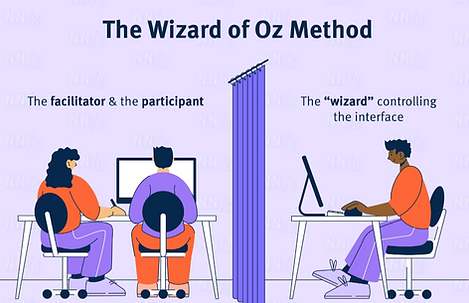
Wizard of Oz (WoZ) prototyping is a user experience research technique where a user interacts with a system they believe is autonomous, but is actually operated by a human ("wizard") behind the scenes. This approach validates complex, high-risk, or non-existent technology (AI, voice control) before building it, focusing on user behavior rather than technical constraints. Think of the operator as an invisible puppeteer for those objects and service elements, simulating the operation of backstage processes, devices, or the environment. The core functionality and value are explored and evaluated.
Researchers also choose how the wizard generates responses during the session:
-
Closed Method: The wizard selects from a predefined set of responses (e.g., standard text snippets or specific screens).
-
Open Method: The wizard creates entirely new, improvised responses on the fly to handle unpredictable user behavior.
-
Hybrid Method: The wizard primarily uses predefined responses but can improvise if a user deviates from the expected path.
Elon Musk once unveiled a prototype humanoid robot that turned out to be a dancer in a costume. His more recent demonstrations are closer—but still not quite there. Read about some other examples of companies faking demonstrations of their not-quite-ready products, then discuss with your team: should companies be required to tell people when demos are slightly or entirely rigged?
The billionaire chief executive of Tesla said the robot, which would be about 5ft 8in (1.7 metres) tall and weigh 56kg, would be able to handle tasks such as attaching bolts to cars with a spanner or picking up groceries at shops. Musk was speaking at Tesla's AI Day event, but gave no indication of having made concrete progress on actually building such a machine. At the point when a normal tech launch might feature a demonstration of a prototype model, Musk instead brought out an actor in a bodysuit, who proceeded to breakdance to a soundtrack of electronic dance music
Since that initial announcement, the project has evolved significantly. In May 2025, Musk shared a viral video of a real Optimus robot performing fluid dance moves autonomously, which he described as "real, real-time". Currently, in 2026, Tesla is unveiling Optimus Gen 3, which features human-level dexterity and is intended for large-scale production.

.jpg)
During a flashy event on a Hollywood movie studio lot in October 2024, for instance, an army of bipedal robots could be seen pouring drinks and conversing with eventgoers — a stunt that turned out to heavily rely on a team of off-camera pilots with remote controls.
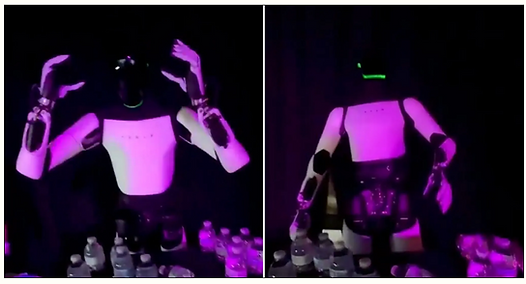
The footage, recorded at Tesla’s “Autopilot technology and Optimus” event at its Miami store this weekend, shows a robot standing behind a table littered with plastic water bottles when it suddenly raises its hands to its temples, losing its balance and stumbling backwards, and ultimately falling flat on its back. The mysterious behavior led many to conclude that it was copying its teleoperator, who was caught removing their virtual reality headset while logging off, abruptly shattering the illusion of autonomy.
Technology leaders have not always been so honest and this article lists out some notable fibs. The first would have been the Turk in the 1770s., but many more followed.
Steve Jobs's iPhone fakery
For the launch of the iPhone unveiling in January 2007, Jobs wasn't above faking a detail or two. This was six months before the launch of what some fans were already calling the Jesus phone, and the prototype models were not ready for primetime. To avoid crashes and freezes during his demo, Jobs used multiple prototypes and a little sleight of hand. Each of those iPhones was designed to follow what his engineers called a "golden path," a very specific sequence of actions, while giving the impression that Jobs was freestyling his way around the device. They also had what you might call a cellular distortion field: the bars at the top of their screens claimed full service no matter what.


Google's voice assistant calling ... who?
At Google I/O 2018, CEO Sundar Pichai demonstrated an AI-powered voice assistant that allegedly called a local hair salon and a local restaurant, live, to make reservations. Both businesses apparently picked up the phone and said, "How can I help you?" Axios quickly ascertained that none of the salons and restaurants in the Mountain View area answered the phone that way. No subsequent questions about this to Google spokespeople were ever answered.
Gemini AI ain't that fast
During a Google demonstration of its AI, Gemini, from December 2023, time was significantly shortened. Many viewers did not realize that the video in question was sped up and had voice prompts dubbed in. Google claimed that this still made the demo "real," but as one user noted: "real but shortened isn't a thing."
Tesla's self-driving deception
Fully Self-Driving (FSD) Teslas, maybe not. In a 2016 video that a Tesla engineer later testified was staged. The video claimed that the driver in it was only there for legal reasons. But the Model X in question followed a predetermined route, the Tesla engineer said when questioned in a lawsuit over an Apple engineer's death in a crash last year. The video showed capabilities that the car's software did not then have, he added, such as stopping at a red light or accelerating at a green. There were multiple takes edited together, and the human driver often intervened.


Some companies have even sold products and services that still secretly relied on people to function properly. Amazon’s AI-powered cashiers at their “Just Walk Out” grocery stores were actually overseen by thousands of low-paid workers; Fireflies.ai makes millions a year selling automated notetaking at meetings, but recently revealed that at first their powerful AI was just the founders listening in and writing stuff down. Look for similar cases, then discuss with your team: should companies be punished for releasing successful products and services that once relied on human intervention but no longer do? Is “fake it ‘til you make it” justified as long as you make it in the end?
Amazon is giving up on the cashier-less “Just Walk Out” technology at its Amazon Fresh grocery stores. The Information reports that new stores will be built without computer-vision-powered surveillance technology, and “the majority” of existing stores will have the tech removed. In the early days, Amazon’s ambitions included selling Just Walk Out to other brick-and-mortar stores. The problem was that the technology never really worked.


“AI” checkout was actually powered by 1,000 human video reviewers in India. A May 2023 report from The Information revealed the myriad tech problems Amazon was still having with the idea six years after the initial announcement. The report said that “Amazon had more than 1,000 people in India working on Just Walk Out as of mid-2022 whose jobs included manually reviewing transactions and labeling images from videos to train Just Walk Out’s machine learning model.”
The report said Amazon’s team “repeatedly missed goals” to cut down on human reviews, and “the reliance on backup humans explains in part why it can take hours for customers to receive receipts.” Amazon will be switching to a more reasonable cashier-less format: shopping carts with built-in checkout screens and scanners. Customers can leisurely scan items as they throw them in the “Amazon Dash Cart,” and the screen will let them instantly see a running total of their purchases. The cart scanners also mean that Amazon no longer needs a small army of store employees to constantly tidy up the shelves so the camera-vision system can work.
Amazon sent along a statement on the news: We’ve invested a lot of time redesigning a number of our Amazon Fresh stores over the last year, offering a better overall shopping experience with more value, convenience, and selection—and so far we’ve seen positive results, with higher customer shopping satisfaction scores and increased purchasing. We’ve also heard from customers that while they enjoyed the benefit of skipping the checkout line with Just Walk Out, they also wanted the ability to easily find nearby products and deals, view their receipt as they shop, and know how much money they saved while shopping throughout the store. To deliver even more convenience to our customers, we’re rolling out Amazon Dash Cart, our smart-shopping carts, which allows customers all these benefits including skipping the checkout line.

